How This Calculator Works
The estimate uses a simple model: reference battery hours for the selected iPhone multiplied by the battery health percentage you enter. For example, if a model is rated at 20 reference hours and your battery health is 85%, the estimate is about 17 hours under similar light video-playback style conditions.
Last reviewed: October 2026 • Content reviewed by: iPhone Life Check Editorial Team • Fact-checked against: Apple's public technical specifications
Complete iPhone Battery Health Guide
Your iPhone's battery health is one of the most important factors determining how long your device lasts between charges. Apple introduced the Battery Health feature in iOS 11.3, giving users transparency into their battery's maximum capacity and peak performance capability. This guide explains everything you need to know about iPhone battery health, from understanding the percentage to knowing when to replace your battery.
What Battery Health Means
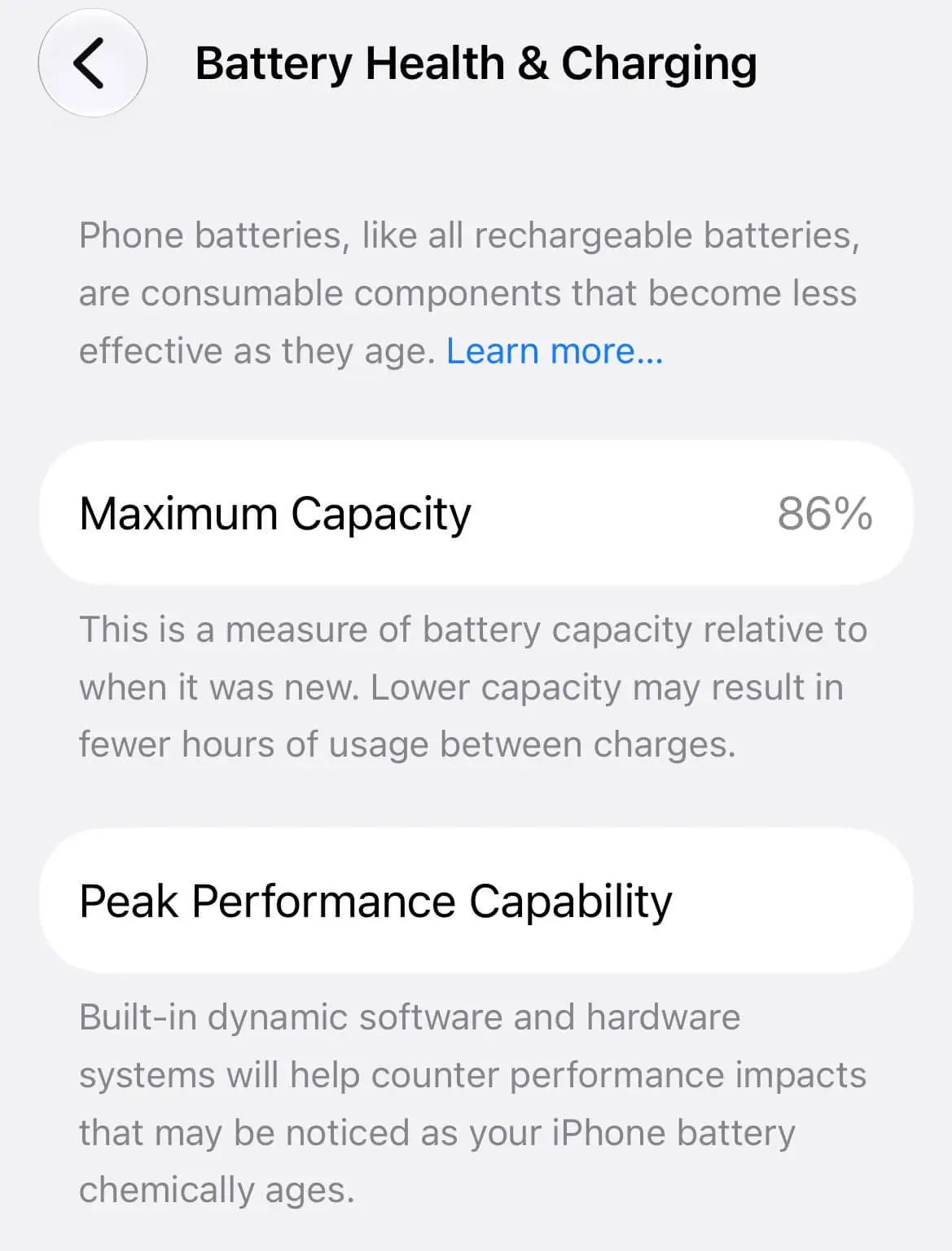
Battery health, displayed as "Maximum Capacity" in Settings, represents the current charge capacity of your iPhone's battery compared to when it was new. A new iPhone battery is rated at 100% capacity. As the battery chemically ages, this percentage gradually decreases. At 85% capacity, your battery holds 85% of the charge it did when brand new.
Apple defines a battery as "consumable" — it has a finite lifespan and will eventually need replacement. The rate of degradation depends on usage patterns, charging habits, temperature exposure, and the number of charge cycles completed.
| Battery Health | Status | Recommended Action |
|---|---|---|
| 90% – 100% | Excellent | Continue normal use. Battery performs as expected. |
| 85% – 89% | Healthy | Monitor backup time. Normal ageing is expected. |
| 80% – 84% | Usable | Backup time may feel shorter. Plan for service. |
| Below 80% | Service Recommended | Contact Apple or an Authorized Service Provider. |
Battery Cycle Count Explained
A charge cycle is completed when you use 100% of your battery's capacity — not necessarily from a single charge. For example, if you use 50% one day and 50% the next day, that equals one charge cycle. Apple designs iPhone batteries to retain up to 80% of their original capacity at 500 complete charge cycles under normal conditions. Newer iPhone models may achieve even better cycle life.
How to check your cycle count: On iPhones running iOS 17 or later, go to Settings > General > About and scroll down to "Battery Cycle Count." Older models may not display this number directly in Settings.
| Cycle Count | Expected Battery Health | Typical Status |
|---|---|---|
| 0 – 200 | 90% – 100% | Excellent |
| 200 – 400 | 85% – 90% | Healthy |
| 400 – 600 | 80% – 85% | Usable |
| 600+ | Below 80% | Service Recommended |
How Apple Measures Battery Health
Apple uses sophisticated algorithms to measure battery health. The system monitors voltage, temperature, charge current, and other parameters to estimate the battery's maximum capacity. This measurement is not a simple voltage check — it's a complex calculation that considers the battery's chemical state and historical performance data.
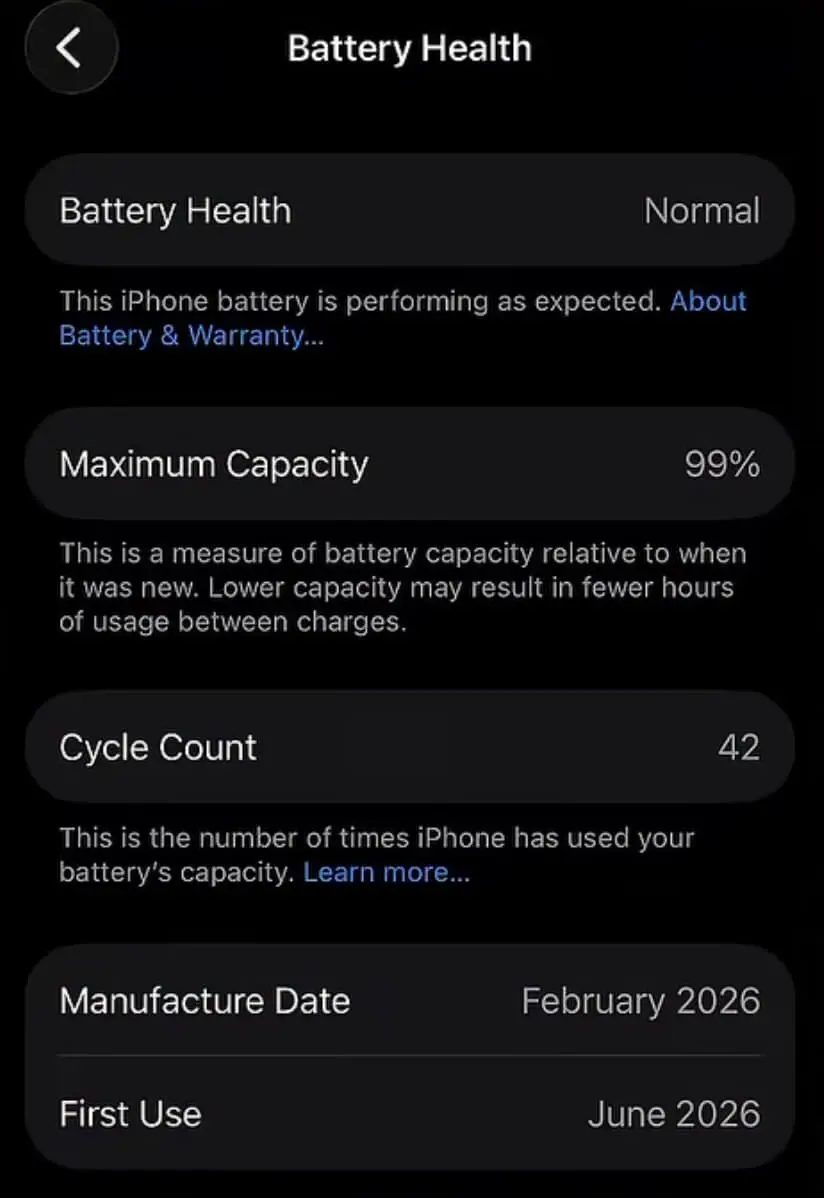
In iOS, the Battery Health section shows:
- Maximum Capacity: The current charge capacity relative to a new battery.
- Peak Performance Capability: Whether the battery can deliver sufficient power to avoid unexpected shutdowns.
- Battery Cycle Count: (iOS 17+) The total number of charge cycles completed.
- Manufacture Date: (iOS 17+) When the battery was manufactured.
- First Use Date: (iOS 17+) When the device was first activated.
Why iPhone Battery Drains Fast
Several factors can cause your iPhone battery to drain faster than expected. Understanding these can help you identify whether the issue is normal usage or a sign of battery degradation.
- Screen Brightness: High brightness is one of the biggest battery drains. Auto-brightness helps manage this.
- Network Signal Strength: In areas with weak cellular signal, your iPhone works harder to maintain a connection, using more power.
- Background App Activity: Apps that refresh in the background can consume significant battery.
- Temperature Extremes: Both hot and cold temperatures affect battery chemistry and efficiency.
- GPS and Location Services: Apps using GPS continuously drain battery quickly.
- 5G Connectivity: 5G networks can consume more power than 4G/LTE, especially in areas with weaker 5G signals.
- Battery Age: As the battery chemically ages, its capacity and efficiency decrease, leading to faster drainage.
Signs You Need Battery Replacement
Here are the most common indicators that your iPhone battery needs replacement:
- Battery health below 80%: This is Apple's general threshold for service recommendations.
- Unexpected shutdowns: Your iPhone turns off even when showing battery charge remaining.
- Rapid drainage: The battery percentage drops quickly during normal use.
- Performance throttling: Your iPhone feels slower, especially during demanding tasks.
- Swelling: The battery expands, causing the screen or back to bulge — stop using the device and get service immediately.
- Service message: iOS displays a "Service" banner in Battery Health settings.
Battery Health vs Battery Life
These terms are often used interchangeably but mean different things:
- Battery Health (Maximum Capacity): A measure of the battery's current capacity compared to when it was new. It's a percentage that decreases with age and cycles.
- Battery Life (Backup Time): The actual amount of time your iPhone runs on a single charge. Battery life depends on health, settings, usage patterns, and environment.
A battery at 100% health will provide the best possible battery life for that iPhone model. At 80% health, the battery life is approximately 80% of what it was when new, assuming identical usage conditions.
Battery Capacity by iPhone Model
Different iPhone models have different battery capacities measured in milliampere-hours (mAh). Here's a comparison of battery capacities and reference video playback hours for recent models.
| Model | Capacity (mAh) | Video Playback (hrs) | Video Streaming (hrs) |
|---|---|---|---|
| iPhone X | 2,716 | 13 | 12 |
| iPhone XR | 2,942 | 16 | 15 |
| iPhone XS | 2,658 | 14 | 13 |
| iPhone XS Max | 3,174 | 15 | 14 |
| iPhone 11 | 3,110 | 17 | 16 |
| iPhone 11 Pro | 3,046 | 18 | 17 |
| iPhone 11 Pro Max | 3,969 | 20 | 19 |
| iPhone 12 mini | 2,227 | 15 | 14 |
| iPhone 12 | 2,815 | 17 | 16 |
| iPhone 12 Pro | 2,815 | 17 | 16 |
| iPhone 12 Pro Max | 3,687 | 20 | 19 |
| iPhone 13 mini | 2,406 | 17 | 16 |
| iPhone 13 | 3,227 | 19 | 18 |
| iPhone 13 Pro | 3,095 | 22 | 20 |
| iPhone 13 Pro Max | 4,352 | 28 | 25 |
| iPhone 14 | 3,279 | 20 | 18 |
| iPhone 14 Plus | 4,325 | 26 | 23 |
| iPhone 14 Pro | 3,200 | 23 | 21 |
| iPhone 14 Pro Max | 4,323 | 29 | 26 |
| iPhone 15 | 3,349 | 20 | 18 |
| iPhone 15 Plus | 4,383 | 26 | 23 |
| iPhone 15 Pro | 3,274 | 23 | 21 |
| iPhone 15 Pro Max | 4,422 | 29 | 26 |
| iPhone 16 | 3,561 | 22 | 20 |
| iPhone 16 Plus | 4,674 | 27 | 24 |
| iPhone 16 Pro | 3,582 | 27 | 24 |
| iPhone 16 Pro Max | 4,685 | 33 | 30 |
| iPhone 16e | 4,000 | 26 | 23 |
| iPhone 17 | 3,692 | 30 | 27 |
| iPhone Air | 3,149 | 27 | 24 |
| iPhone 17 Pro | 4,252 | 33 | 30 |
| iPhone 17 Pro Max | 5,088 | 39 | 35 |
| iPhone 17e | 4,005 | 26 | 23 |
| iPhone 18 Pro | 4,288 | 36 | 33 |
| iPhone 18 Pro Max | 5,567 | 45 | 40 |
| iPhone Duo (outer display) | ~5,400* | 44 | 37 |
| iPhone Duo (inner display) | ~5,400* | 31 | 26 |
iPhone 18 Pro and 18 Pro Max figures are for the eSIM-only (US) models, in line with the iPhone 17 Pro rows above. Models with a physical SIM tray have slightly smaller batteries (4,056 mAh and 5,391 mAh) and Apple rates them at up to 34 and 43 hours of video playback in several regions. *Apple does not publish the iPhone Duo battery capacity; the dual-battery total shown is as reported by third parties. The iPhone Duo is rated by Apple separately for each display, and the calculator lets you choose either. The iPhone Duo is scheduled for release on October 23, 2026.
Common Battery Problems
iPhone users frequently encounter these battery-related issues:
- Battery Percentage Drops Quickly: Often caused by battery ageing, background apps, or network conditions.
- Phone Shuts Down at 20-30%: A sign of an aged battery that can no longer deliver peak power.
- Slow Charging: Check your charger, cable, or the device's lightning/USB-C port.
- Overheating During Charging: Remove the case and charge in a cool environment.
- Battery Health Not Updating: iOS updates may reset the health reporting; wait a few days for accurate readings.
Charging Myths and Facts
There are many misconceptions about iPhone battery charging. Here are the facts:
- Myth: You should always drain your battery to 0% before charging.
Fact: Modern lithium-ion batteries work best with partial discharges. Avoid deep discharges below 20%. - Myth: Overnight charging damages the battery.
Fact: iPhones have built-in optimized charging that stops charging at 80% and finishes before you wake up. - Myth: Using your phone while charging is dangerous.
Fact: It's safe, but the phone may generate more heat, which can affect battery health long-term. - Myth: You must use Apple-branded chargers only.
Fact: Certified third-party chargers (MFi) are safe and effective. - Myth: 5W chargers are always better for battery health.
Fact: While slower charging generates less heat, Apple's fast charging (up to 20W) is designed to be safe and efficient.
Battery Saving Tips
Extend your iPhone battery life with these proven strategies:
- Enable Optimized Battery Charging: Settings > Battery > Battery Health > Optimized Battery Charging.
- Reduce Screen Brightness: Use auto-brightness or manually lower the brightness slider.
- Turn Off Background App Refresh: Settings > General > Background App Refresh.
- Disable Location Services: Settings > Privacy & Security > Location Services.
- Use Wi-Fi Instead of Cellular: Wi-Fi uses less power than cellular data.
- Enable Dark Mode: On OLED models, dark mode can save significant battery.
- Manage Push Notifications: Limit apps that can send push notifications.
- Update iOS Regularly: Apple often includes battery optimizations in updates.
- Remove Unused Apps: Background processes from unused apps can drain battery.
- Use Airplane Mode: In areas with no signal, enable Airplane Mode to save battery.
Battery Replacement Cost Guide
iPhone battery replacement costs vary depending on your model and warranty status. Here's what to expect:
| Model | Out-of-warranty | With AppleCare+ |
|---|---|---|
| iPhone X, XR, XS, XS Max | $89 | $0 (if eligible) |
| iPhone 11, 11 Pro, 11 Pro Max | $89 | $0 (if eligible) |
| iPhone 12, 12 mini, 12 Pro, 12 Pro Max | $89 | $0 (if eligible) |
| iPhone 13, 13 mini, 13 Pro, 13 Pro Max | $89 | $0 (if eligible) |
| iPhone 14, 14 Plus, 14 Pro, 14 Pro Max | $99 | $0 (if eligible) |
| iPhone 15, 15 Plus, 15 Pro, 15 Pro Max | $99 | $0 (if eligible) |
| iPhone 16, 16 Plus, 16 Pro, 16 Pro Max, 16e | $109 | $0 (if eligible) |
| iPhone 17, Air, 17 Pro, 17 Pro Max, 17e | $119 | $0 (if eligible) |
| iPhone 18 Pro, 18 Pro Max | $129 | $0 (if eligible) |
| iPhone Duo | Not yet published | Check Apple Support |
Prices are for out-of-warranty service at Apple Stores. Third-party repair services may offer lower prices. Always use authorized providers to maintain safety and avoid voiding warranties.
Methodology: How We Calculate Backup Time
Data Sources
Our reference hours are derived from Apple's published technical specifications for video playback on each iPhone model. These values represent the maximum expected playback time under ideal conditions with a new battery at 100% health.
Calculation Formula
Estimated Backup Time = Reference Hours × (Battery Health Percentage ÷ 100)
This formula assumes a linear relationship between battery health and backup time, which is a reasonable approximation for estimation purposes.
Limitations
This calculator provides estimates only. Actual battery life is influenced by many factors including screen brightness, network signal strength, temperature, background apps, gaming, camera use, 5G connectivity, GPS usage, and individual usage patterns. The estimate should be used as a comparative tool rather than a precise prediction.
Content Review Process
All content on this website is reviewed regularly against Apple's public documentation and support articles. Our editorial team verifies technical accuracy and updates content when new information becomes available. The calculator is tested on an ongoing basis to ensure accuracy across all supported models.
Why You Can Trust This Calculator
- Independent: We are not affiliated with Apple Inc. and have no commercial relationship with battery service providers.
- Transparent: Our methodology and formula are fully disclosed.
- Data-Driven: Reference values come from official Apple specifications.
- Educational: Our goal is to help users understand battery health and make informed decisions.
- Regular Updates: We review and update our data as new iPhone models are released and Apple publishes new information.
Why Trust iPhone Life Check
- Independent website — We are not affiliated with Apple Inc. and provide objective, unbiased information.
- Uses Apple public documentation — All reference data is sourced from Apple's official technical specifications and support articles.
- Updated regularly — We review and update our calculator and content when Apple releases new models or updates battery guidance.
- Transparent methodology — Our calculation formula is fully disclosed so you understand exactly how estimates are derived.
- Educational purpose — We exist to help iPhone users understand battery health and make informed decisions about battery care and replacement.
- No hidden agenda — We don't sell batteries, repair services, or affiliate products. Our sole focus is providing useful, accurate information.
Detailed FAQ Section
Related Reading
Go deeper on specific topics covered in this guide with these companion articles from our blog:
An extended breakdown of Maximum Capacity, Peak Performance Capability, and what each reading means.
How charge cycles are counted and how to check yours by model.
Step-by-step settings to slow down battery ageing day to day.
What battery health number is reasonable to expect on a second-hand iPhone.
Battery capacity and playback time differences between generations.
Realistic day-to-day expectations beyond the lab-tested reference hours.
Browse all articles on the blog →
Editorial Standards & Corrections
Every figure in this guide — battery capacities, reference playback hours, cycle-count thresholds, and replacement pricing — is cross-checked against Apple's own published specifications and support documentation before publishing, and reviewed again whenever Apple updates its guidance or ships a new iPhone model. We do not accept payment to alter reference data or the calculator's formula. Read more about our methodology and editorial team.
Spotted a figure that looks out of date, or a number that doesn't match Apple's current documentation? Tell us on the Contact page and we'll review it — corrections are typically actioned within a few business days.
Sources and References
These references are included so readers can verify key battery-health guidance instead of relying only on this calculator.