iOS 27.2 Update: New Features, Siri AI & Should You Install It?
iOS 27.2 arrived on October 26, 2026, with changes to Siri AI, Messages, Photos, Podcasts, Apple Music and Shortcuts, alongside security fixes. The most useful change may be Siri’s ability to recall earlier conversations—but that feature is not available on every iPhone.
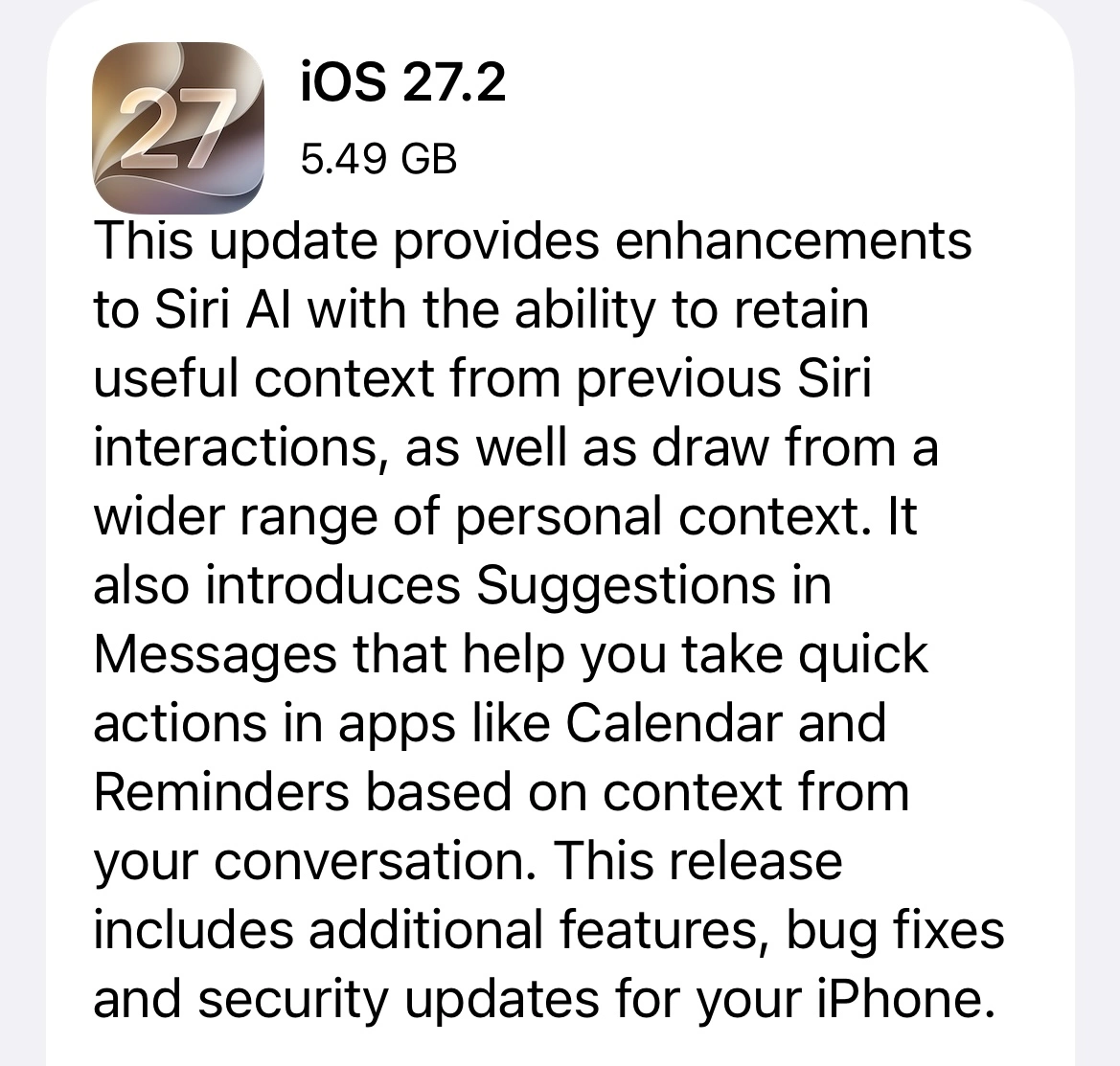
If you have opened Settings → General → Software Update and found iOS 27.2, this guide explains what actually changed, which features your iPhone can use, how much storage to plan for, and what to check before installing.
iOS 27.2 at a glance
| Question | What to know |
|---|---|
| Release date | October 26, 2026 |
| Main highlights | Siri AI conversation recall, contextual Messages suggestions, Photos Shared Albums improvements and Shortcuts changes |
| Security | Apple published a dedicated security-content page listing fixes for multiple vulnerabilities |
| Download size | Varies by model and current iOS version. A screenshot may show 5.49 GB; check your own Software Update screen for the actual size. |
| Who gets Siri AI? | All iPhone 16 models and later, plus iPhone 15 Pro and iPhone 15 Pro Max, subject to language and regional availability |
Apple’s release notes are the best source for what is officially included. Features can vary by device, region and language, so do not assume every iOS 27.2 feature will appear on every compatible iPhone.
1. Siri AI can remember earlier conversations
The headline change is conversation recall. Instead of treating every request as completely separate, Siri AI can use useful context from previous Siri interactions. For example, you may be able to ask about a restaurant it recommended earlier without having to explain the entire conversation again.
More personal context sources
Apple says Siri AI can also draw on a wider range of personal context, including:
- Photos attached in Messages: useful when a picture shared in a conversation is relevant to a request.
- Calendar attendees: context about people associated with an event may help answer a related question.
- Voicemails: Siri AI can use voicemail context when relevant.
- Safari history and Reading List: Apple says results from these sources are improved.
These capabilities do not mean Siri will always infer the right answer. The result depends on the request, the information available to the device, supported languages and feature availability.
Choose which apps Siri can access
iOS 27.2 adds a redesigned Excluded Apps control for deciding which apps Siri, Search and suggestions can access. This is useful if you want to limit the information available to these features. Review the available controls on your own iPhone rather than assuming the defaults match your privacy preferences.
Copy only the part of a Siri answer you need
Apple has added more precise text selection in Siri AI responses. Instead of copying an entire answer, you can select a specific portion. It is a small usability improvement, but practical when you only need an address, a short explanation or a few lines of text.
2. Other useful iOS 27.2 features
Suggestions in Messages
Messages can show tappable suggestions based on the conversation. For example, a discussion about dinner plans may offer a way to create a Calendar event, while other supported suggestions can relate to Reminders, Notes, Maps, flights or packages. These are shortcuts to help you take an action; check the details before confirming anything.
Shared Albums in Photos
Shared Albums gain several practical changes: captions and comments can be edited, duplicate photos can be avoided, and a reminder can appear before an album expires so participants have a chance to save important photos and videos.
SynthID labels for some AI-generated or edited images
Apple’s release information describes SynthID watermarking for Image Playground images and certain Photos edits. This is intended to help identify some images generated or modified with generative tools. It should not be treated as a universal detector that can identify every AI image or every edit.
Apple Music gets a visual refresh
Apple Music has a new black-and-white app icon and changes to some of the app’s accent colours and widgets. This is mainly a visual change, not a promise of better sound quality or longer battery life.
Podcasts and Games changes
The Podcasts Home tab separates New Episodes from Continue Playing, making it easier to distinguish new releases from shows already in progress. The Games app’s Friends tab adds more context to friend suggestions and recent games played on friends’ pages.
Profiles in the Apple TV app
Simple Profiles let household members keep viewing recommendations more separate. This can be useful when several people share an Apple TV app, although the exact experience may depend on device and account setup.
Shortcuts and automation improvements
Apple’s official iOS 27.2 notes also list improvements to automations and shortcut editing. These include additional automation options for supported devices, expanded workout automation support, better app automation details and the ability to edit shortcut names and icons directly from the iOS or iPadOS library. Some of the listed changes apply only to other Apple platforms or specific devices.
Other platform-specific changes
Apple’s release notes and reporting also describe changes that are limited to particular devices, regions or apps, including Apple Pencil support on iPhone Duo, expanded FaceTime accessibility options and an alternative App Tracking Transparency prompt in the European Union. Do not assume these changes apply to every iPhone or region.
3. Which iPhones support iOS 27.2 and Siri AI?
Apple’s security documentation lists iPhone 11 and later among the devices covered by iOS 27.2. That does not mean every compatible model gets every AI feature.
| Device group | iOS 27.2 | Siri AI features |
|---|---|---|
| iPhone 11 and later compatible models | Check Settings for the update offered to your device | Not all models support Siri AI |
| iPhone 15 Pro and iPhone 15 Pro Max | Supported | Listed as supported, subject to language and region |
| All iPhone 16 models and later | Supported where the update is offered | Listed as supported, subject to language and region |
For the definitive answer for your phone, open Settings → General → Software Update. Apple may offer different versions depending on the model and the software already installed. Also check Apple’s feature availability page before buying or updating a device specifically for Siri AI.
4. How large is the iOS 27.2 update?
The screenshot supplied for this guide shows a download of 5.49 GB. Treat that as the size shown on that particular update screen—not a universal download size for all iPhones.
Update size can vary according to your iPhone model, the version currently installed and the update package Apple offers. The temporary storage needed during preparation and installation can also differ from the displayed download size.
- Check the exact size shown under Settings → General → Software Update.
- Keep more free space than the download alone requires if possible, because installation may need temporary working space.
- If the update will not download, remove only files or apps you no longer need, or follow Apple Support’s storage guidance.
- Use a stable Wi-Fi connection if available and connect the iPhone to power.
5. Will iOS 27.2 affect battery life or performance?
Apple’s iOS 27.2 feature summary does not describe this as a dedicated battery-life update. It would be misleading to promise that battery life will improve—or to claim that every iPhone will experience battery drain.
For a deeper explanation of Maximum Capacity and battery ageing, read our complete iPhone battery health guide.
After a major software update, an iPhone may continue background tasks such as indexing and syncing. Battery use and temperature can therefore vary temporarily. Your results depend on the model, battery condition, apps, signal strength and how you use the phone.
If your battery seems worse after updating
- Open Settings → Battery and check which apps or activities used the most power.
- Give the phone time to finish post-update tasks, especially during the first day or two.
- Install app updates and restart the iPhone if the problem persists.
- If unusual heating, rapid drain or shutdowns continue, consult Apple Support instead of assuming the update is the only cause.
Do not judge battery health from one day of usage. Compare similar usage patterns over several days and check Battery Health if your iPhone offers that section.
Use the free iPhone Life Check battery calculator as an estimate, not as a diagnostic measurement of battery health.
Use the Battery Calculator →6. iOS 27.2 security fixes: why they matter
Apple published a dedicated security-content document for iOS 27.2 and iPadOS 27.2. It lists fixes affecting multiple system components. For example, Apple describes an issue in AccessorySetupKit that could allow a malicious app to access Bluetooth without user consent, and other fixes involving privacy preferences, sensitive data and input validation.
These descriptions explain why security updates matter even when you are not interested in new visual features. The details and affected components are documented by Apple, so use its security page for the complete and authoritative list.
7. How to download and install iOS 27.2 safely
- Back up your iPhone to iCloud or a computer.
- Connect to a reliable Wi-Fi network and plug your iPhone into power, or make sure the battery is sufficiently charged.
- Open Settings → General → Software Update.
- Wait for the phone to check which version is available.
- If iOS 27.2 is offered, tap Download and Install and follow the on-screen instructions.
- Keep the phone connected to power and do not force-restart it while the installation progress bar is moving.
- After installation, check your iOS version under Settings → General → About.
There is no single installation time that applies to every iPhone. Download speed, available storage, preparation and verification can all affect how long it takes. If the update repeatedly fails or remains stuck for an unusually long time, consult Apple’s troubleshooting instructions before trying more drastic steps.
8. Should you update to iOS 27.2?
- Update sooner: if you want the latest security fixes or use the apps and features improved in this release.
- Check compatibility first: if you are updating mainly for Siri AI. Supported hardware, language and region all matter.
- Plan storage: use the size shown on your own Software Update screen rather than relying on a screenshot from another phone.
- Consider waiting briefly: if your work depends on a critical app and its developer has reported a compatibility problem. Check for a fix before updating.
The biggest practical reason to install iOS 27.2 is the combination of security fixes and useful changes across system apps. Siri AI is a headline feature, but it is not the only reason to update—and it is not available on every compatible iPhone.
Frequently asked questions
What is new in iOS 27.2?
Highlights include Siri AI conversation recall and wider personal context, Suggestions in Messages, Shared Albums improvements, SynthID labels for some AI-created or edited images, changes to Podcasts and Games, Apple TV profiles and Shortcuts improvements. Availability varies by device and region.
Should I install iOS 27.2?
For most compatible iPhones, installing the latest public update offered in Settings is sensible because it includes features and security fixes. Back up first and check essential-app compatibility.
How large is the iOS 27.2 update?
The size varies by model and the version already installed. One screenshot shows 5.49 GB, but that is not a universal size. Check Settings → General → Software Update on your own iPhone.
Which iPhones get Siri AI in iOS 27.2?
Apple lists all iPhone 16 models and later, plus iPhone 15 Pro and iPhone 15 Pro Max. Other iPhones may receive iOS 27.2 without supporting Siri AI.
Does iOS 27.2 improve battery life?
Apple does not describe it as a dedicated battery update. Battery life can vary temporarily after installation while background tasks finish. Check Settings → Battery and compare usage over several days.
Does Siri AI support Hindi?
Hindi is not on Apple’s currently listed Siri AI language list for this release. Apple lists English, French, Japanese, Korean, Portuguese and Spanish. Language and regional availability can affect access.
How do I install iOS 27.2?
Go to Settings → General → Software Update. If iOS 27.2 is offered, tap Download and Install. Back up first, use a reliable connection and keep the iPhone connected to power.
Does iOS 27.2 include security fixes?
Yes. Apple published a dedicated security-content page listing addressed vulnerabilities. Read Apple’s official security document for the complete details.
Will every iOS 27.2 feature work on every iPhone?
No. Some features need newer hardware, a supported language, a supported region or a particular app/device configuration. Siri AI has stricter requirements than the general iOS update.
Official sources and further reading
This guide prioritises Apple’s release notes and security documentation. Third-party reports were used to cross-check feature descriptions; they do not replace Apple’s official compatibility information.
- Apple Support: New in iOS, iPadOS, macOS, watchOS and visionOS 27 — official feature notes.
- Apple Support: About the security content of iOS 27.2 and iPadOS 27.2 — official security details.
- Apple Developer: iOS 27.2 release entry — release listing.
- MacRumors: iOS 27.2 Features: Everything New — independent feature roundup.
- 9to5Mac: Apple releases iOS 27.2, here’s what’s new — independent release coverage.